Unsubscribe from symbols in the live API
Databento's live API now supports unsubscribing from symbols without closing and reconnecting to a new session. This allows you to stop streaming data for symbols you no longer need while continuing to receive real-time data for other symbols in the same session.
You can unsubscribe from any combination of symbols, even if you subscribed to them at different times. Once a connection is established, you can unsubscribe before or after streaming begins.
Each unsubscribe request specifies a single schema and the symbols to remove. For example, the following unsubscribes from NQZ6 while continuing to stream trades for ESZ6:
# Subscribe to trades for two symbols
client.subscribe(
    dataset="GLBX.MDP3",
    schema="trades",
    symbols=["ESZ6", "NQZ6"],
)

# Stop streaming trades for NQZ6
client.unsubscribe(
    schema="trades",
    symbols="NQZ6",
)
You can also specify symbols="ALL_SYMBOLS" to stop streaming data for every symbol you've subscribed to using a particular schema. If you're streaming data in multiple schemas within the same session, the others are unaffected.
The stype_in parameter indicates how symbols are identified, whether by raw symbol, instrument ID, or parent symbol.
When unsubscribing, the symbology type must be compatible with how you subscribed to those symbols. For example, if you subscribed to NQ.FUT using parent symbology, you must also specify stype_in="parent" when unsubscribing:
client.unsubscribe(
    schema="trades",
    stype_in="parent",
    symbols="NQ.FUT",
)
The diagram below illustrates the symbology compatibility requirements with example symbols and instrument IDs.
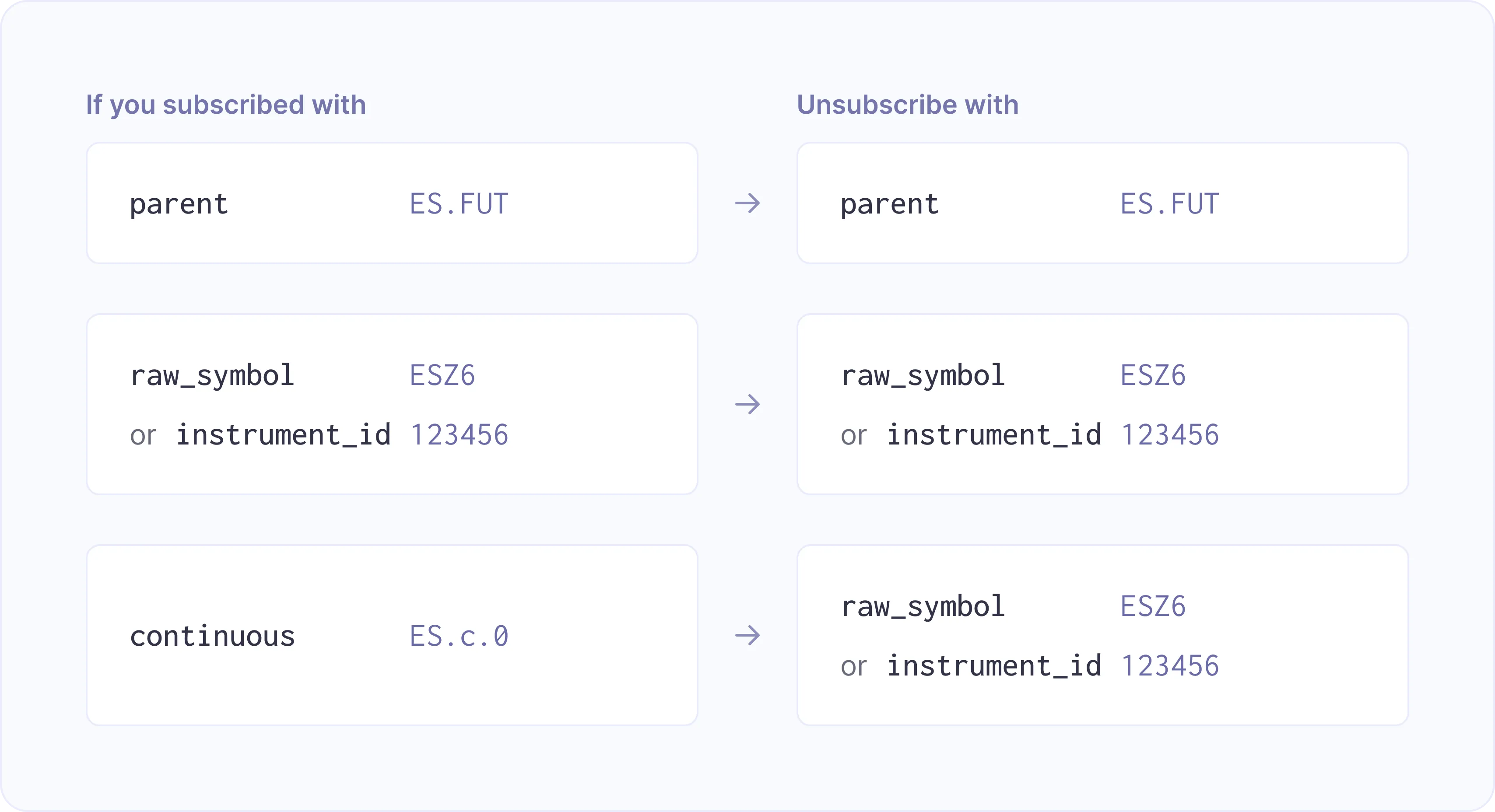
- Parent symbology: Individual instruments included through a parent symbol cannot be unsubscribed separately.
- Raw symbol and instrument ID symbology: These types can be used interchangeably when unsubscribing, provided the original subscription used either one.
- Continuous symbology: The gateway provides the resolved raw symbol and instrument ID in a
SymbolMappingMsgwhen streaming begins. These are available through thestype_out_symbolandinstrument_idfields, respectively, and either can be used to unsubscribe from the corresponding instrument.
For more details on using unsubscribe, see our documentation.
The following examples demonstrate how to unsubscribe from E-mini Nasdaq-100 (NQ.FUT) futures while continuing to stream trades for E-mini S&P 500 (ES.FUT) futures.
To use unsubscribe with Databento's live client libraries, update to Python 0.89.0, Rust 0.64.0, or C++ 0.69.0 or later. No update is required when connecting directly to the raw API.
Jump to: Python · Rust · C++ · Raw API
import databento as db

client = db.Live()

client.subscribe(
    dataset="GLBX.MDP3",
    schema="trades",
    stype_in="parent",
    symbols=["ES.FUT", "NQ.FUT"],
)

client.start()

# Later, while streaming, stop trades for NQ futures
client.unsubscribe(
    schema="trades",
    stype_in="parent",
    symbols="NQ.FUT",
)

# Continue streaming data for ES.FUT

client.terminate()
use databento::{
LiveClient,
dbn::{SType, Schema},
live::{Subscription, Unsubscription},
};
let mut client = LiveClient::builder()
.key_from_env()?
.dataset("GLBX.MDP3")
.build()
.await?;
client
.subscribe(
Subscription::builder()
.symbols(vec!["ES.FUT", "NQ.FUT"])
.schema(Schema::Trades)
.stype_in(SType::Parent)
.build(),
)
.await?;
client
.unsubscribe(
Unsubscription::builder()
.symbols("NQ.FUT")
.schema(Schema::Trades)
.stype_in(SType::Parent)
.build(),
)
.await?;#include <databento/enums.hpp>
#include <databento/live.hpp>
namespace db = databento;
auto client = db::LiveBlocking::Builder()
.SetKeyFromEnv()
.SetDataset("GLBX.MDP3")
.BuildBlocking();
client.Subscribe({"ES.FUT", "NQ.FUT"}, db::Schema::Trades, db::SType::Parent);
client.Unsubscribe({"NQ.FUT"}, db::Schema::Trades, db::SType::Parent); When connecting without a client library, you can send the equivalent unsubscribe request using the raw API protocol. Since NQ.FUT was originally subscribed to using parent symbology, the unsubscribe request also specifies stype_in=parent:
unsubscribe|schema=trades|stype_in=parent|symbols=NQ.FUT