Determine publishing times for statistics
Official exchange-published statistics for an instrument can be published at various times. There are statistics that are published continuously throughout the day, while other statistics are only published a few times per day. Additionally, this publishing behavior may be different between venues.
Overview
We'll use the Historical client to retrieve all statistics for an instrument to determine when statistics are published.
We'll request data from the statistics schema, which contains all official statistics published by the venue. We'll also request data from the status schema. This status schema data will show how changes in market state can affect publishing times for various statistics.
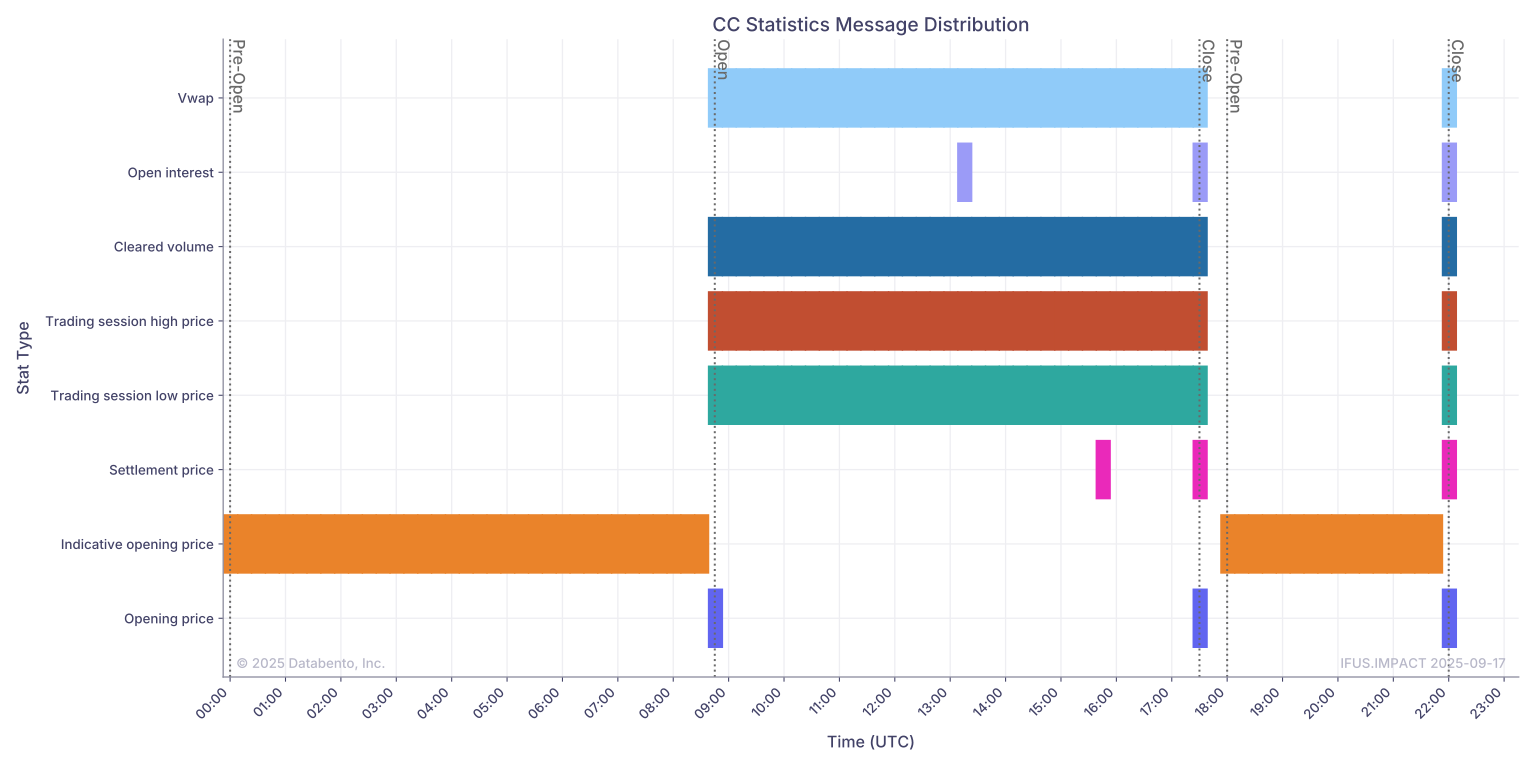
We'll plot this data to show when each statistic is published.
Example
1
2
3
4
5
6
7
8
9
10
11
12
13
14
15
16
17
18
19
20
21
22
23
24
25
26
27
28
29
30
31
32
33
34
35
36
37
38
39
40
41
42
43
44
45
46
47
48
49
50
51
52
53
54
55
56
57
58
59
60
61
62
63
64
65
66
67
68
69
70
71
72
73
74
75
76
77
78
79
80
81
82
83
84
85
86
87
88
89
90
91
92
93
94
95
96
97
98
99
100
101
102
103
104
105
106
107
108
109
110
111
112
113
114
115
116
117
118
119
120
121
import datetime as dt
import databento as db
import matplotlib.pyplot as plt
import pandas as pd
from matplotlib.dates import DateFormatter, MinuteLocator

# Create mapping of statistic type to human-readable name
stat_type_dict = {x.value: x.name.replace("_", " ").capitalize() for x in db.StatType.variants()}


def plot_statistics_distribution(
    symbol: str,
    stats_data: pd.DataFrame,
    status_data: pd.DataFrame,
):
    """Plot publishing time distribution of each statistic type"""
    stats_data = (
        stats_data.groupby("stat_type")
        .resample("15min", include_groups=False)
        .size()
        .unstack(level=0)
        .fillna(0)
    ).transpose()
    stats_data = stats_data.rename(index=stat_type_dict)

    _, ax = plt.subplots(figsize=(16, 8))

    times = pd.to_datetime(stats_data.columns)
    time_width = pd.Timedelta(minutes=15)

    # Plot horizontal bars for each statistic type
    for idx, stat_type in enumerate(stats_data.index):
        mask = stats_data.loc[stat_type] > 0
        if mask.any():
            ax.barh(
                idx,
                width=time_width * 1.1,
                left=times[mask] - time_width / 2,
                label=stat_type,
            )

    # Plot vertical lines for changes in market state
    for idx, row in status_data.iterrows():
        ax.axvline(
            x=idx,
            color="dimgray",
            linestyle=":",
            linewidth=1.5,
        )
        ax.text(
            x=idx,
            y=ax.get_ylim()[1],
            s=str(row["action"]),
            ha="left",
            va="top",
            rotation=-90,
            color="dimgray",
        )

    # Format axes
    ax.set(
        yticks=range(len(stats_data)),
        yticklabels=stats_data.index,
        xlabel="Time (UTC)",
        ylabel="Stat Type",
        title=f"{symbol} Statistics Message Distribution",
    )
    ax.xaxis.set_major_formatter(DateFormatter("%H:%M"))
    ax.xaxis.set_major_locator(MinuteLocator([0, 60]))
    ax.set_axisbelow(True)
    ax.grid()

    plt.setp(ax.xaxis.get_majorticklabels(), rotation=45, ha="right")
    plt.tight_layout()
    plt.show()


# Set parameters
dataset = "IFUS.IMPACT"
product = "CC"
start = "2025-09-17"

client = db.Historical("$YOUR_API_KEY")

# Request statistics data for the continuous contract
stats_df = client.timeseries.get_range(
    dataset=dataset,
    symbols=f"{product}.v.0",
    stype_in="continuous",
    schema="statistics",
    start=start,
).to_df()

# Request status data for the continuous contract
status_df = client.timeseries.get_range(
    dataset=dataset,
    symbols=f"{product}.v.0",
    stype_in="continuous",
    schema="status",
    start=start,
).to_df()

# Filter out midnight snapshot
status_df = status_df[status_df.index.time != dt.time.min]

# Only keep certain market states
# For a full list of variants, see https://databento.com/docs/schemas-and-data-formats/status#status-action-variants
status_map = {1: "Pre-Open", 7: "Open", 12: "Close"}
status_df = status_df[status_df["action"].isin(status_map)]
status_df = status_df[status_df["trading_event"] != 1]
status_df["action"] = status_df["action"].map(status_map)

# Print out the number of occurrences for each statistic type
print(stats_df["stat_type"].map(stat_type_dict).value_counts())

# Plot distribution of statistic publishing time
plot_statistics_distribution(
    symbol=product,
    stats_data=stats_df,
    status_data=status_df,
)
Result
Taking a look at this example for Cocoa futures on ICE Futures US, you will notice how certain statistics, such as cleared volume and VWAP, are published continuously throughout the day. Other statistics, such as open interest and settlement price, are published only a few times per day.
1
2
3
4
5
6
7
8
9
10
stat_type
Trading session high price    4482
Trading session low price     4482
Vwap                          4482
Cleared volume                4482
Indicative opening price      3060
Opening price                    3
Open interest                    3
Settlement price                 3
Name: count, dtype: int64