Indices: Introduction
This article introduces additional concepts to get started with indices data on Databento. If you're new to Databento, see the Quickstart guide.
Overview
In this example, we'll introduce:
- The Databento Core Indices dataset
- How to discover index update frequencies
- How to plot index prices
- Special conventions for indices vs. other asset classes offered by Databento
Using the indices dataset
Our Databento Core Indices feed includes, but is not limited to:
- Flagship benchmarks (e.g. SPX and VIX)
- Strategy indices (e.g. PUTR and BXR)
- ETF fair values (e.g. TQQQIV and SSOIV)
- Crypto values (e.g. BTC1RP and ETH100RP)
- US benchmarks (e.g. RUT and RUI)
- US market and style indices (e.g. MSTAR and MWMF)
- Global equity indices (e.g. MXEA and MXWLD)
To use index data on Databento, navigate to our indices catalog page and find its dataset ID at the top left of the page.
For this example, we'll use the Databento Core Indices (DBIX.CORE) dataset. This ID will be passed into the dataset parameter of any API or client method.
Update frequency
Unlike market data for order-driven instruments, which updates in response to individual trades or order book updates, index values are calculated and published according to an index-specific schedule. The publication frequency varies by index, ranging from intraday updates every few seconds to values published only once per day.
Since these records are not sent out at perfect intervals, there is some variance in the send times. We can estimate the observed update cadence for any index using Databento's MBP-1 schema, which provides every single update to the index price at the moment it was released.
For instance, to find the update frequency of the Morningstar US Target Market Exposure Index (MUFT):
1
2
3
4
5
6
7
8
9
10
11
12
13
import databento as db
client = db.Historical(key="$YOUR_API_KEY")

muft = client.timeseries.get_range(
    dataset="DBIX.CORE",
    symbols=["MUFT"],
    start="2026-02-18",
    schema="mbp-1"
).to_df()

intervals = muft["ts_event"].diff().dt.total_seconds()

print(intervals.describe())
1 2 3 4 5 6 7 8 9
count 1638.000000 mean 14.999921 std 0.305004 min 11.611000 25% 14.961000 50% 15.000000 75% 15.042750 max 18.405000 Name: ts_event, dtype: float64
We can see that MUFT updates approximately every 15 seconds, with small variations in the observed interval between updates. We can use this method for any index in the DBIX dataset.
Plotting index bid, ask, and price values
The official price of an index is calculated from last sale data. However, for some indices, a bid and ask value may also be calculated which is similar to the index value but is calculated from bid and ask prices instead of last sale prices. Databento normalizes these fields to bid_px_00, ask_px_00, and price in the bbo-1s schema. We can plot these values for SPX:
Although these fields may resemble market prices, the bid and ask values are calculated index values rather than executable orders, and there is no underlying order book depth.
1 2 3 4 5 6 7 8 9 10 11 12 13 14 15 16 17 18
import databento as db
import matplotlib.pyplot as plt

client = db.Historical(key="$YOUR_API_KEY")

spx = client.timeseries.get_range(
    dataset="DBIX.CORE",
    symbols=["SPX"],
    start="2026-02-18",
    schema="bbo-1s",
    limit=400
).to_df()

prices = spx[["ask_px_00", "price", "bid_px_00"]]
prices = prices.rename(columns={ "ask_px_00": "ask", "bid_px_00": "bid"})

prices.plot()
plt.show() 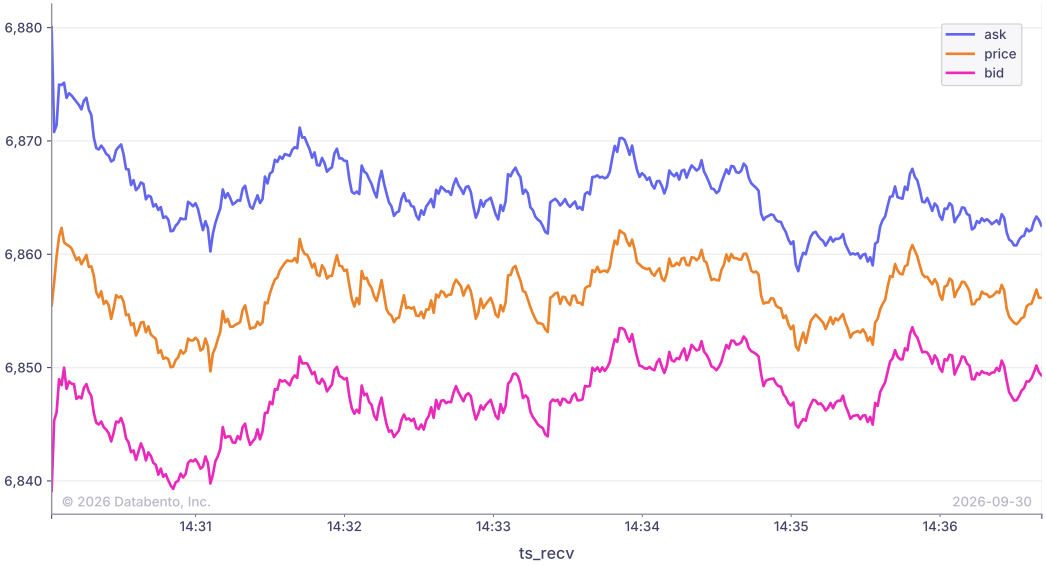
Special conventions for indices on Databento
- Source timestamp precision. Although Databento timestamps are represented in nanoseconds, some venues within DBIX may not provide that same granularity natively. Databento adds no additional source precision beyond that which is provided by the underlying venues.
- Instrument definitions. DBIX instruments are always normalized with
instrument_classset toINDEX, andmatch_algorithmset toUNDEFINED, since there is no matching engine associated with an index feed. - Indicative index values. Some DBIX indices under the the
publisher_idDBIX.CORE.CGImay publish indicative values, which are estimated or preliminary values marked as not being final. For these records, Databento applies theF_PUBLISHER_SPECIFICflag, allowing them to be distinguished from normal index values. - See more on our venue details page.