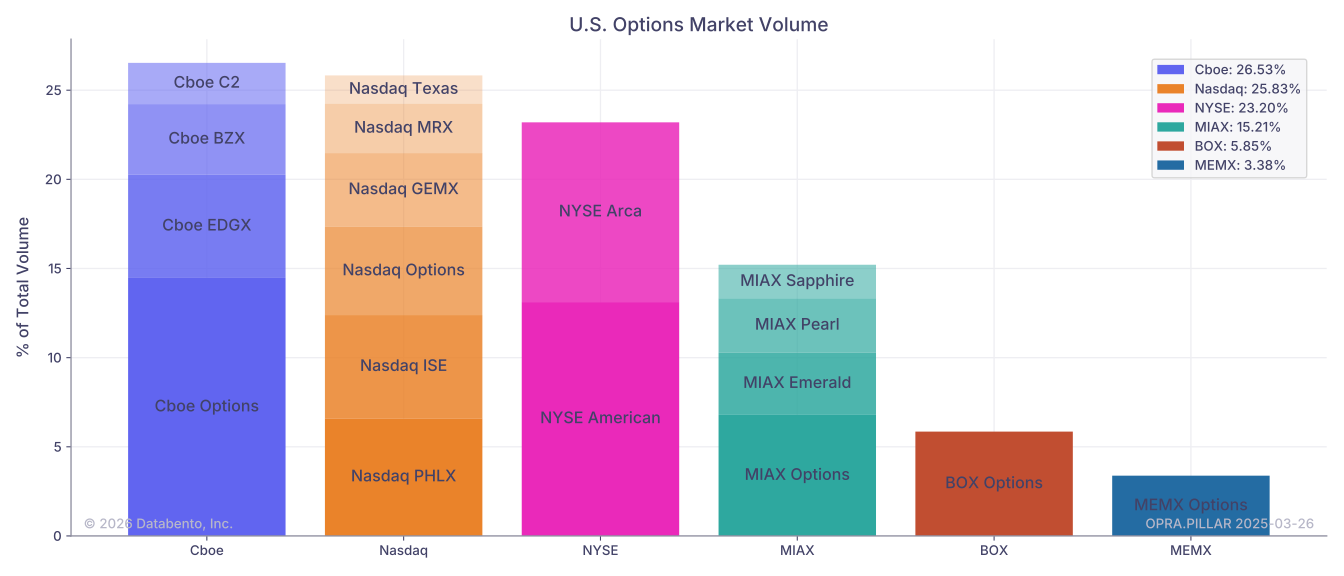
US equity options volume by venue
Overview
This example will use the Historical client to retrieve data from the entire US equity options market and compare volume across execution venues.
We'll use the OHLCV-1m schema and look at data over a 30-minute window. This example could be modified to look at the entire session by changing the start and end variables, or by using the OHLCV-1d schema.
The OPRA datafeed provides consolidated options data for the 20 US equity options venues. The publisher_id field indicates which venue the record is associated with.
Using this information, we will create a table and plot similar to the data found in Cboe's Market Volume Summary report.
See also
For a full list of the OPRA venues, see the OPRA documentation.
Example
1
2
3
4
5
6
7
8
9
10
11
12
13
14
15
16
17
18
19
20
21
22
23
24
25
26
27
28
29
30
31
32
33
34
35
36
37
38
39
40
41
42
43
44
45
46
47
48
49
50
51
52
53
54
55
56
57
58
59
60
61
62
63
64
65
66
67
68
69
70
71
72
73
74
75
76
77
78
79
80
81
82
import databento as db
import matplotlib.pyplot as plt
from matplotlib.patches import Patch

# Set parameters
dataset = "OPRA.PILLAR"
start = "2025-03-26T14:00"
end = "2025-03-26T14:30"

# Create a historical client
client = db.Historical(key="$YOUR_API_KEY")

# Request OHLCV-1m data for ALL_SYMBOLS and convert to DataFrame
df = client.timeseries.get_range(
    dataset=dataset,
    schema="ohlcv-1m",
    symbols="ALL_SYMBOLS",
    start=start,
    end=end,
).to_df()

# Aggregate volume by venue
df = df.groupby("publisher_id", as_index=False)["volume"].sum()
df["percentage"] = df["volume"] / df["volume"].sum() * 100

# Rename publisher_id and columns for readability
publishers = client.metadata.list_publishers()
venue_name_map = {
    x["publisher_id"]: db.Publisher.from_int(x["publisher_id"]).venue.description
    for x in publishers
}
df["publisher_id"] = df["publisher_id"].map(venue_name_map)
df = df.rename(columns={"publisher_id": "Venue", "volume": "Volume", "percentage": "% of Total"})

# Calculate volume by group and sort
df["Group"] = df["Venue"].str.split(" ").str[0]
df["Group Volume"] = df.groupby("Group")["Volume"].transform("sum")
df = df.sort_values(by=["Group Volume", "Volume"], ascending=[False, False])
df = df[["Group", "Venue", "Volume", "% of Total"]]

print(df.set_index(["Group", "Venue"]).to_string(float_format="%0.2f"))

# Now, let's plot this data
fig, ax = plt.subplots(figsize=(14, 6))

group_handles = []  # Legend handles
for group_idx, group in enumerate(df["Group"].unique()):
    group_data = df[df["Group"] == group]

    # Create handle for plot legend
    group_pct = group_data["% of Total"].sum()
    group_handles.append(Patch(facecolor=f"C{group_idx}", label=f"{group}: {group_pct:.2f}%"))

    last_venue_pct = 0
    for i, (_, venue_data) in enumerate(group_data.iterrows()):
        venue_pct = venue_data["% of Total"]  # Used as height for each venue section

        # Add section for venue
        bar = ax.bar(
            x=group,
            height=venue_pct,
            bottom=last_venue_pct,
            color=f"C{group_idx}",
            alpha=1.0 - i * 0.15,
        )
        # Add the venue label
        ax.text(
            x=group_idx,
            y=last_venue_pct + venue_pct / 2,
            s=" ".join(venue_data["Venue"].split(" ")[:2]),
            ha="center",
            va="center",
        )
        last_venue_pct += venue_pct

ax.legend(handles=group_handles)

ax.set_title("U.S. Options Market Volume")
ax.set_ylabel("% of Total Volume")

plt.tight_layout()
plt.show()
1 2 3 4 5 6 7 8 9 10 11 12 13 14 15 16 17 18 19 20
                              Volume  % of Total
Group  Venue
Cboe   Cboe Options           954511       14.47
       Cboe EDGX Options      381901        5.79
       Cboe BZX Options       261275        3.96
       Cboe C2 Options        152628        2.31
Nasdaq Nasdaq PHLX            435190        6.60
       Nasdaq ISE             381951        5.79
       Nasdaq Options         327166        4.96
       Nasdaq GEMX            272005        4.12
       Nasdaq MRX             182480        2.77
       Nasdaq Texas Options   105090        1.59
NYSE   NYSE American Options  865360       13.12
       NYSE Arca Options      664865       10.08
MIAX   MIAX Options           447819        6.79
       MIAX Emerald           230339        3.49
       MIAX Pearl             201093        3.05
       MIAX Sapphire          124162        1.88
BOX    BOX Options            386105        5.85
MEMX MEMX Options 222973 3.38